
ClickUp is a project management software that is designed to help teams collaborate more effectively. It provides a wide range of features and tools to help teams manage their tasks, projects, and workflows. In this blog post, we’ll explore the advantages and disadvantages of using ClickUp.

Advantages
Customizability
One of the biggest advantages of using ClickUp is its customizability. ClickUp allows users to customize their workspace and workflows to meet their specific needs. This means that teams can create their own workflows, task statuses, and custom fields to track the progress of their projects. Additionally, ClickUp provides a wide range of integrations with other tools and services, which means that teams can easily connect ClickUp to their existing workflows.
Collaboration
ClickUp is designed to help teams collaborate more effectively. It provides a wide range of collaboration tools, including comments, mentions, and task assignments. Additionally, ClickUp allows users to share files and documents directly within the platform, which means that teams can keep all of their project-related information in one place.
User-Friendly Interface
ClickUp has a user-friendly interface that is easy to navigate. It provides a clean and intuitive design that makes it easy for users to find what they’re looking for. Additionally, ClickUp provides a wide range of keyboard shortcuts and other productivity tools to help users work more efficiently.
Multiple Views
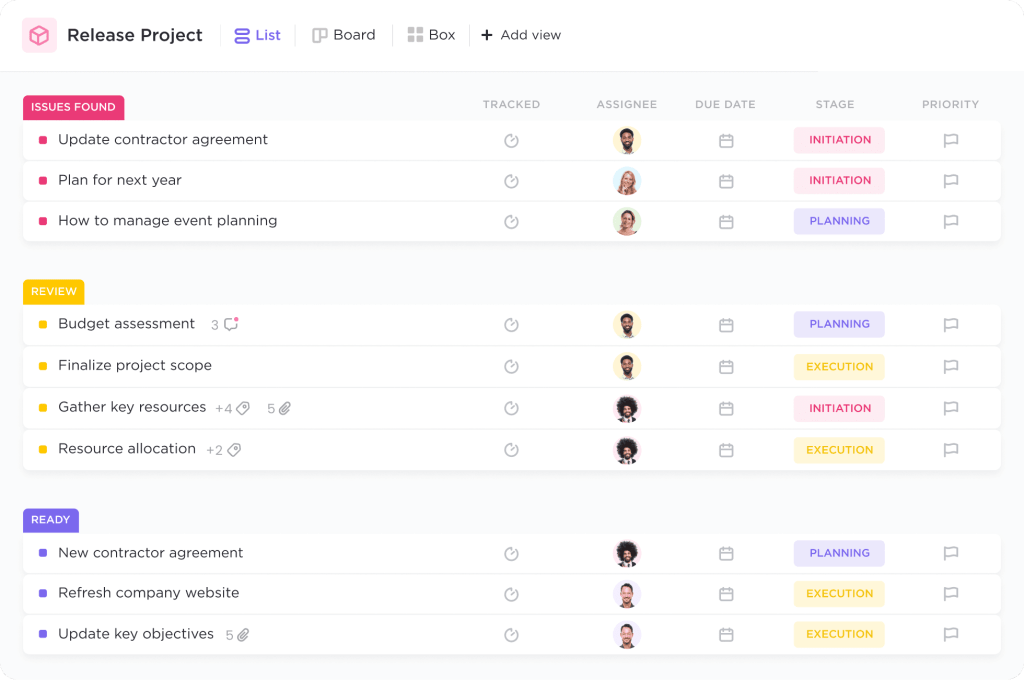
ClickUp provides multiple views of tasks and projects, including list view, board view, and calendar view. This means that teams can choose the view that works best for them and their specific project needs. Additionally, ClickUp provides a Gantt chart view, which allows teams to visualize their project timeline and dependencies.
Mobile App
ClickUp has a mobile app that is available for iOS and Android devices. The mobile app provides many of the same features as the desktop version, which means that users can manage their tasks and projects on-the-go.
Integrations
ClickUp provides a wide range of integrations with other tools and services, including Google Drive, Trello, Slack, and more. This means that teams can easily connect ClickUp to their existing workflows and tools.
Disadvantages
Complexity
One potential disadvantage of using ClickUp is its complexity. While ClickUp provides a wide range of features and tools, it can be overwhelming for some users. Additionally, some users may find that they need to spend time learning how to use all of the features and tools in order to get the most out of the platform.

Cost
ClickUp offers both free and paid plans. While the free plan provides many of the basic features that most teams need, some teams may find that they need to upgrade to a paid plan in order to access all of the features and tools they need. Additionally, the cost of ClickUp’s paid plans can be higher than some other project management software options.
Limited Reporting
While ClickUp provides many features for managing tasks and projects, it has limited reporting capabilities. This means that teams may need to export data from ClickUp in order to create custom reports or analyze their project data in more detail.
Limited Customization Options
While ClickUp provides many customization options for managing tasks and projects, there are some limitations to what users can customize. For example, users cannot customize the colors or branding of the platform.
Conclusion
Overall, ClickUp is a powerful project management software that provides many advantages for teams looking to collaborate more effectively. Its customizability, collaboration tools, user-friendly interface, multiple views, mobile app, and integrations make it a popular choice for many teams. However, its complexity, cost, limited reporting capabilities, and limited customization options are potential disadvantages that teams should consider when evaluating whether ClickUp is the right project management software for their needs.
 Geetchy